






Over 10 years we help companies reach their financial and branding goals. Engitech is a values-driven technology agency dedicated.

Gallery

Contacts

411 University St, Seattle, USA

engitech@oceanthemes.net

+1 -800-456-478-23

softphoneapp

Harnessing the power of cloud infrastructure and communications, SoftPhoneApp will revolutionise your business telephony. SoftPhoneApp is a carrier grade solution, has all of the benefits of an advanced traditional PBX—voice, call transfer, fax, voicemail, voicemail to email, conferencing,  etc.—on a consumption based model and no up-front capital expense. Certainty and value is assured through our flat rate call plans.  

SoftPhoneApp is available on Desktop and Smartphone

Turn your PC or Mac computer into a full-featured telephony experience.

Everything you expect from a phone system with the added advantages of video conferencing, messaging and presence management. Using the latest technology and SIP standards, SoftPhoneApp Desktop provides business users with carrier-grade communication solutions that can be tailored to meet the needs of any size organization.

Designed to enhance the way you work, SoftPhoneApp is a dynamic, next generation softphone application that enables you to manage your communications easily and efficiently – all from your desktop computer.

  • Make HD voice and 1080p video calls over IP using H.264 and VP8 codecs for crisp, clear calls
  • Send and receive Instant Messages, and share files, videos and images from within SoftPhoneApp
  • Create and name public or private chat rooms to streamline conversations
  • See user presence in real-time and set your presence status to reduce distractions and increase productivity
  • Comprehensive call history panel with access to call details and recordings
  • Communicate faster with Microsoft® Outlook integration on SoftPhoneApp for Windows, enabling the ability to make calls, see presence status, and send messages, all from within Outlook

Mobile communications on a whole new level.

SoftPhoneApp clients for iOS and Android are an extension to your company’s PBX and feature a multitude of communication options, superior security and encryption and advanced audio codecs.

SoftPhoneApp for iOS

SoftPhoneApp for iOS is a SIP-based softphone for Apple iPhone, iPad and iPod touch that uses a Wi-Fi or cellular data network connection to make and receive voice and video calls, send messages and see user presence.

SoftPhoneApp puts business-class communications tools in your pocket so no matter where you are in the world, you stay connected.

  • Make HD voice and video calls over IP
  • Send and receive Instant Messages, and share files, videos and images from within SoftPhoneApp
  • Create and name public or private chat rooms to streamline conversations
  • See user presence in real-time and set your presence status to reduce distractions and increase productivity
  • Comprehensive call history panel with access to call details and recordings

SoftPhoneApp for Android
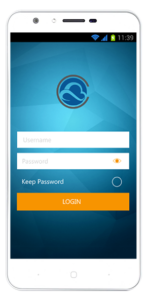
SoftPhoneApp for Android is a SIP-based softphone that uses a Wi-Fi or cellular data network connection to make and receive voice and video calls, send messages and see user presence.

SoftPhoneApp puts business-class communications tools in your pocket so no matter where you are in the world, you stay connected.

  • Make HD voice and video calls over IP
  • Send and receive Instant Messages, and share files, videos and images from within SoftPhoneApp
  • Create and name public or private chat rooms to streamline conversations
  • See user presence in real-time and set your presence status to reduce distractions and increase productivity
  • Comprehensive call history panel with access to call details and recordings


SoftPhone Features

Desktop

  • Make HD voice and conference calls  
  • View, send and receive ultra high-definition HD video up to 1080p  
  • Detachable, full screen video window 
  • Standard telephony features include single click to call, speakerphone, mute, 3 way calls, and ability to transfer, forward and hold calls 
  • Call recording 
  • Comprehensive Call History with grouping, recording management, filtering and exporting, all from the History panel 
  • Set display and sound alerts for incoming calls 
  • Hide your ID for calls 
  • Employ “Do Not Disturb” function for audio and video calls 
  • Missed calls indicator 
  • Support for voicemail with Message Waiting Indicator (MWI) 
  • Send instant messages to from your contact list when you see they are online 
  • Send 1:1 messages or start a Chat Room for group chats 
  • Create public or private Chat Rooms to streamline conversations 
  • Use @ mentions to notify/alert contacts within Chat Rooms 
  • Control pop-up notification and sound alerts for incoming IMs 
  • Employ “Do Not Disturb” function for blocking incoming Instant Messages 
  • Preview hyperlinks within messages 
  • Send files, images, videos and documents within 1:1 messages 
  • Take screen captures and send directly within 1:1 messages
  • Set your presence status so team members know how and when to get a hold of you best 
  • Receive or block notification alerts for contacts’ presence status updates 
  • Establish unique privacy rules for your presence status for individual contacts 
  • Manage, sort and filter contacts with support for contact avatars 
  • Synchronize your contacts with Microsoft Outlook® personal address book (Windows only) or Mac Address Book (Mac only) 
  • Integrate G Suite contacts into your address book 
  • Create groups for contacts with the ability to place one contact in several groups 
  • Set a default contact method for each contact 
  • Add a contact during a call 
  • Search contacts by name, number, email address or Jabber id (jid) 
  • Focused around your address book, SoftPhoneApp’s contact-centric interface gives you more ways to make, receive and manage your calls and IMs 
  • Navigate contacts, favourites, call history and dial pad with just a click of your mouse 
  • Scale SoftPhoneApp to different sizes to maximize space on your desktop 
  • Support for both Microsoft Office 2013 and 2016 
  • Place an audio or a video call, send an IM, and see presence information directly from the mini-contact card that appears when you hover over a contact 
  • Secure communications across voice, video and messaging 
  • Advanced security with signaling and media encryption via TLS and SRTP 
  • Firewall traversal and compliance with the latest standards (ICE, STUN, & TURN) 

iOS

SoftPhoneApp for iOS is an award-winning SIP-based softphone for the iPhone, iPad and iPod touch.  

  • Make superior quality voice and conference calls  
  • View, send and receive HD video in up to 720p  
  • Standard telephony features include speakerphone, mute and hold functions, multiple call support, call transfer, merge and split calls, and more 
  • Call display and voicemail indicator 
  • Call history with a list of received, missed and dialled calls, and integrated in the native iOS call history 
  • Call recording with ability to share using Airdrop, cloud services, or email 
  • Support for DTMF: the ability to enter numbers to use an auto attendant 
  • Via RFC 2833, SIP INFO and in-band 
  • Send and receive messages in real-time and see when contacts are available 
  • Send files, images, videos and documents within 1:1 messages 
  • Preview hyperlinks within messages 
  • Create public or private Chat Rooms to streamline conversations 
  • Use @ mentions to notify/alert contacts within Chat Rooms 
  • Set your presence status so team members know how and when to get a hold of you best 
  • Manage, sort and filter contacts with support for contact avatars 
  • Synchronize SoftPhoneApp contacts with your devices Contact list 
  • Add contacts to your Favourites list for easy access 
  • Add a contact during a call 
  • Navigate contacts, favourites, messages, call history, and dialpad with a simple touch 
  • Multitask with ease, running SoftPhoneApp in the background while you complete other tasks 

Enjoy zero battery life impact when SoftPhoneApp is in the background with  SoftPhoneApp Push services 

  • Secure communications across voice, video and messaging with encryption via TLS and SRTP for signalling and media 
  • Firewall traversal and compliance with the latest standards (STUN, ICE, TURN) 
  • Secure connection to provisioning, messaging/presence servers 

The following accessories are supported: 

  • Headset with microphone (including Bluetooth™): SoftPhoneApp uses the ear-piece and microphone on the headset. 
  • Headphones (no microphone): SoftPhoneApp uses the ear-piece on the headphone and the built-in microphone. 

Android

SoftPhoneApp for Android is an award-winning SIP-based softphone available for the majority of mobile devices that support the Android OS.

  • Make superior quality voice and conference calls  
  • View, send and receive HD video in up to 720p  
  • Standard telephony features include speakerphone, mute and hold functions, multiple call support, call transfer, merge and split calls, and more 
  • Call display and voicemail indicator 
  • Call history with a list of received, missed and dialled calls, and integrated in the native call history 
  • Support for DTMF: the ability to enter numbers to use an auto attendant 
  • Via RFC 2833, SIP INFO and in-band 
  • Send and receive messages in real-time and see when contacts are available 
  • Send files, images, videos and documents within 1:1 messages 
  • Preview hyperlinks within messages 
  • Create public or private Chat Rooms to streamline conversations 
  • Use @ mentions to notify/alert contacts within Chat Rooms 
  • Set your presence status so team members know how and when to get a hold of you best 
  • Manage, sort and filter contacts with support for contact avatars 
  • Synchronize SoftPhoneApp contacts with your devices Contact list 
  • Add a contact during a call 
  • Navigate contacts, favourites, messages, call history, and dialpad with a simple touch 
  • Multitask with ease using multi-window support – display a second app side-by-side with SoftPhoneApp 

Enjoy zero battery life impact when SoftPhoneApp is in the background with SoftPhoneApp Push services 

  • Secure communications across voice, video and messaging with encryption via TLS and SRTP for signalling and media 
  • Firewall traversal and compliance with the latest standards (STUN, ICE, TURN) 

The following accessories are supported: 

  • Headset with microphone (including Bluetooth™): SoftPhoneApp uses the ear-piece and microphone on the headset. 
  • Headphones (no microphone): SoftPhoneApp uses the ear-piece on the headphone and the built-in microphone. 

Why Choose CommsChannel?